







Security Assertion Markup Language (SAML)
What is SAML?
SAML stands for Security Assertion Markup Language and is one of the most commonly used standards for exchanging authentication data. SAML enables Single Sign-On securely. Users authenticate once, after which they do not need to log in again.
This is possible because applications, 'service providers', trust all systems that verify user identities, 'identity providers'.
SAML is a foundational standard for many Federated Identity Management (FIM) solutions. Federated Identity Management (FIM) is a concept in which an authentication solution can be used across organizations. Other FIM standards include OpenID and OAuth. All of these solutions share two common objectives:
Deliver a Positive User Experience: Quick and simple access to applications with one set of login credentials.
Improve Security: No storing login credentials in separate databases.
Why SAML?
SAML, as part of Federated Identity Management (FIM) solutions, is designed to make users’ lives easier and more secure. Without such solutions, users would be forced to manage separate credentials for each site they use, which can lead to security risks.
Here are some key reasons to consider using SAML:
Reduction of Insecure Situations: It is not uncommon for end users to write passwords on sticky notes and keep them under the keyboard. SAML reduces this risk by decreasing the number of credentials users must remember and enter.
Enhanced Security: SAML increases security by reducing the risk of phishing attacks and password leaks. All communication between the identity provider and the service provider is encrypted, which reduces the likelihood of data interception.
Efficiency: SAML enables Single Sign-On (SSO), allowing users to log in once to access multiple applications or services. This saves time and reduces user frustration.
Ease of Use: By implementing an advanced access management solution, such as SAML, in your organization, end users can streamline daily access to the applications they need. This reduces downtime caused by forgotten passwords and locked accounts.
Privacy: SAML can be configured to share only the necessary user information, which protects user privacy.
Flexibility and Interoperability: SAML is an open standard, meaning it can be implemented across a wide range of systems and applications, regardless of the programming language or platform on which they are built.
In short, SAML provides a secure, efficient, and user-friendly solution for managing digital identities and performing authentication and authorization in a distributed environment. It is an essential component of any effective FIM solution.
SAML and Privacy
In today’s digital era, privacy is a key concern. SAML plays a crucial role in protecting user privacy during authentication.
One way SAML achieves this is by minimizing the amount of personal information shared between the Service Provider (SP) and the Identity Provider (IdP). In a SAML transaction, the IdP sends a SAML assertion to the SP. This assertion contains information about the user’s identity and the authentication status, but it does not need to include detailed personal information. The SP only needs to know that the user has been successfully authenticated by the IdP, not exactly who the user is.
In addition, all information exchanged in a SAML transaction is encrypted and digitally signed. This ensures that data cannot be intercepted or altered during transmission, thereby further protecting user privacy and security.
It is also important to note that SAML can be configured to comply with various privacy regulations, such as the General Data Protection Regulation (GDPR) in the European Union. This makes SAML an attractive choice for organizations that need to comply with privacy regulations.
In short, SAML provides a secure and privacy-friendly way to exchange authentication and authorization data between different parties. It helps organizations protect user privacy while delivering an efficient, user-friendly authentication experience.
How Does SAML Work?
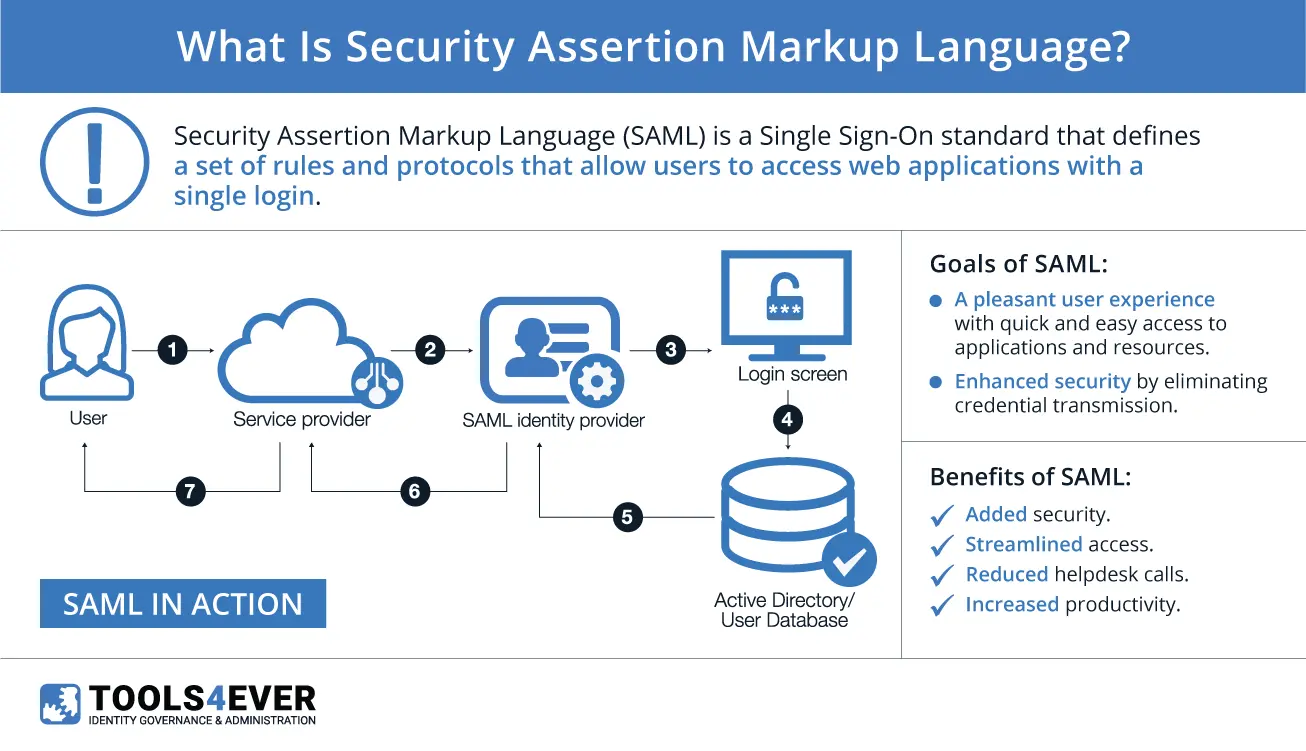
To fully understand how SAML works, we start by exploring the concept of a SAML provider. A SAML provider is any server that participates in verifying and authorizing a user in a SAML request. There are two types of SAML Providers: service providers (SP) and identity providers (IdP).
Service Providers (SP) are the systems and applications that users access throughout the day. Without SSO, each system would need to maintain its own database of credentials. The more applications you use, the more different credentials you must remember and manage.
With SSO standards such as SAML, users no longer need to remember multiple passwords. They log in to their IdP once and then access their preferred applications. Authentication from that point on is automatic and transparent to the user.
An Identity Provider (IdP) is the system that authenticates users. This is the central location where credentials are actually stored and validated. Once a user signs in to their IdP, they have access to their SSO-enabled applications. Various IdPs are available on the market. (Azure) AD is often used as an IdP, but HelloID can also be deployed.
The conversation between the identity and service providers occurs via a message called an Assertion. This is an XML document created by the IdP and verified by the SP. It contains all relevant end-user details: a unique ID, name, and any additional attributes required by the SP.
All assertions are signed with an X.509 certificate by the IdP. The SP has a copy of the certificate fingerprint, which is used to verify the authenticity of the assertion. This prevents unauthorized access.
SAML Authentication Explained: How Does it Work in Practice?
The SAML authentication process begins when a user tries to access a service, such as a web application. This service is referred to as the Service Provider (SP). The SP sends a request to the Identity Provider (IdP) to verify the user’s identity.
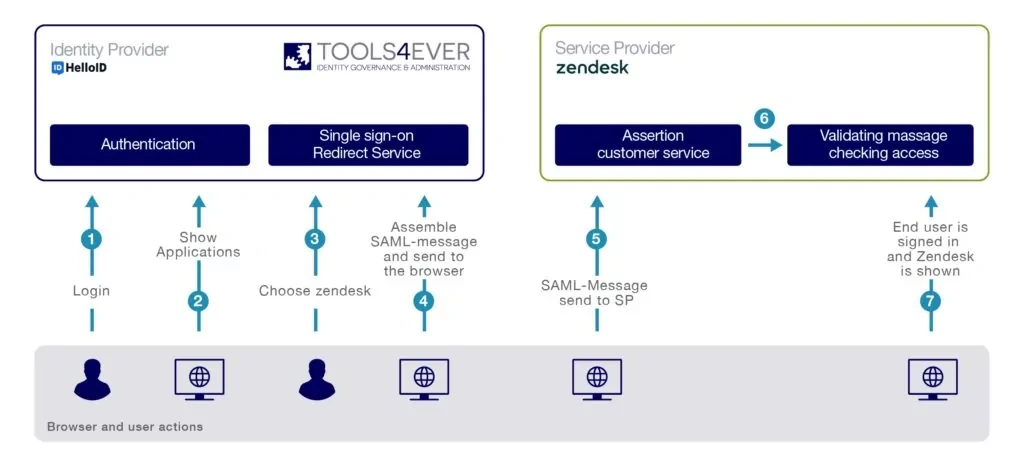
Let us illustrate this with a concrete example where HelloID serves as the IdP and TOPdesk as the SP:
The user signs in to the HelloID portal (IdP) with a username and password combination. Other authentication methods are also possible.
HelloID displays a list of applications to the user.
The user clicks TOPdesk (SP).
HelloID generates a SAML message to authenticate with TOPdesk. HelloID signs and/or encrypts the message using a certificate.
The SAML message is sent to TOPdesk.
TOPdesk verifies the SAML message using a certificate and checks access.
The user is logged in to TOPdesk without encountering a login page.
This entire process is seamless and transparent for the user. Most importantly, SAML provides a secure and efficient way to manage and share identities in a distributed environment. SAML can be used in much more complex scenarios, with multiple SPs and IdPs, and with more advanced assertion types that provide more detailed information.
SAML Providers
In order to fully understand how SAML works, we’ll start by exploring the concept of a “SAML provider”. A SAML provider is any server that is involved in the authentication and authorization of a user during a SAML request. More specifically, the two types of SAML providers mirror those in any other SSO exchange: service providers (SP) and identity providers (IdP).
Service Providers (SP)
SPs are the systems and applications that users access throughout the day. Before SSO, each of them would maintain their own database of usernames and passwords. The more applications a person used, the more usernames and passwords they would need to remember and manage. This increase in the number of credentials per user incentivized undesirable password management practices, from using the same password across multiple websites and services to even writing passwords down on sticky notes.
With the advent of SSO standards like SAML, users don’t need to remember numerous passwords. They only need to log into their IdP a single time, and are immediately granted access to their connected applications. Authentication from that point on is automatic and transparent to the user.
Identity Provider (IdP)
An IdP is the system that performs user authentication. This is the central location where user credentials are actually stored and validated. Once a user logs into their identity provider, they have access to their SSO-enabled applications. When a user opens an application, the IdP and the SP work together to authenticate and authorize the user, granting them access if appropriate.
 SAML Assertions
The conversation that happens between an IdP and SP is done through a message called an “assertion”. A SAML assertion is the message that the identity provider sends to the service provider. This is an XML (i.e., extensible markup language) document that is created by the IdP, verified by the SP, and contains all of the user’s identity details relevant for authentication. This includes their unique identifier, their name, and any additional attributes that may be required by the SP. Assertions are sometimes referred to as “claims” and both terms can be used interchangeably.
An assertion is constructed according to the SAML standards laid out in 2005 when the SAML2 standard was finalized by the OASIS consortium.ii Assertions are signed with an X.509 certificate by the identity provider. The service provider has a copy of the certificate’s “fingerprint”, which it uses to verify the authenticity of the assertion. This prevents malicious attackers, who do not have the certificate, from forging assertions and gaining unauthorized access.
Alternatives to SAML
Although SAML is a popular choice for managing Single Sign-On (SSO) and federated identity, other technologies provide similar functionality. Here are some of the most common alternatives to SAML:
OpenID Connect: An open standard for end-to-end user authentication, enabling identity federation across domains. OpenID Connect is built on OAuth 2.0 and uses JSON Web Tokens (JWT) to exchange claims.
OAuth 2.0: Although it is often used with OpenID Connect for authentication, OAuth 2.0 by itself is primarily used for authorized access to APIs. It allows a user to grant an application access to their information with another service provider without sharing their credentials.
WS-Federation: A protocol for federated identity based on the WS-* (Web Services) specifications. It is often used in Microsoft environments and is integrated into products such as Active Directory Federation Services (ADFS).
LDAP (Lightweight Directory Access Protocol): Although it is not a federated identity protocol, LDAP is often used to store and look up information in a directory service, such as usernames and passwords. It can be used with other technologies to implement SSO.
Each of these alternatives has its own advantages and disadvantages, and the best choice depends on your organization's specific needs and circumstances. It is important to consider which protocol best fits your technical requirements, security needs, and the skills and knowledge of your IT team.
What can SAML do for You?
SAML (and any other federated identity technology) serves to make the lives of users easier and more secure. Without it, users are forced to manage different credentials for every system, application, and website that they use. Such a massive collection of credentials remains difficult to manage—at best leading to forgotten passwords and halting productivity, at worst opening users and their organizations up to malicious attackers and identity theft.iii
By introducing a comprehensive single sign-on solution to your organization, its end users will have streamlined access to the applications they need on a daily basis. This reduces downtime caused by forgotten passwords and locked accounts, which translates directly into higher productivity and increased morale. All of this can contribute to a positive effect on a company’s bottom line, making an investment in single sign-on solutions a clear winner in terms of ROI.
HelloID cloud software HelloID white paper
Not a Tools4ever customer yet, but interested in the capabilities?
Schedule a MeetingRelated Articles
- SAML vs OAuth vs OpenID Connect
- Access Management: Setting up application integration using SAML, WS-Federation, OpenID Connect
- Access Management - Where to start?
- How HelloID Can Improve Your Organization’s Security
- Web SSO vs Enterprise SSO
- Web SSO vs Enterprise SSO, Revisted
- What’s the Future of Cloud SSO?