








Single Sign-On (SSO)
In today's digital world, with countless applications and platforms in use every day, managing multiple credentials has become a challenge.
Constantly signing in and out of different systems can be time-consuming and frustrating, and remembering multiple passwords can lead to unsafe practices, such as using overly simple passwords or writing passwords down.
This is where Single Sign-On (SSO) comes in. In this article, we examine what SSO is, how it works, and why it matters in today's digital environment.
What is Single Sign-On (SSO)?
Single Sign-On, or SSO, means end users need to sign in only once. The SSO software then ensures that authentication to other applications occurs automatically.
This means that after signing in to one application, users automatically gain access to all other applications they are authorized for, without having to sign in again.
This is a significant shift from a few years ago, when a small set of applications was all a user needed to do their job.
In today's digital environment, where users often need access to dozens of applications, SSO provides an efficient, user-friendly solution for managing access rights.
Benefits of Single Sign-On (SSO)
Ease of Use: Users need to remember only one set of credentials, simplifying and accelerating sign-in.
Increased Productivity: Less time spent signing in means more time for real work.
Improved Security: By reducing the number of credentials to remember, SSO reduces the likelihood of unsafe password practices.
Efficient Access Rights Management: Administrators can easily manage which users have access to which applications, all from a single central location.
Reduced IT Support: With fewer forgotten passwords to reset, IT teams can focus on more important tasks.
Drawbacks of Single Sign-On (SSO)
Single Point of Failure: If the SSO solution goes down, users may be unable to access any application.
Security Risks: If a user's credentials are compromised, an attacker may gain access to all applications the user is authorized for.
Compatibility Issues: Not all applications support SSO, resulting in inconsistent user experiences.
The risk with Single Sign-On is that once you are signed in, you have access everywhere. It is therefore strongly recommended to integrate any SSO solution with an additional layer of authentication (Two Factor Authentication).
How Secure is SSO?
Single Sign-On (SSO) is designed to improve both usability and security. By reducing the number of credentials users must remember, SSO reduces the risk of unsafe password practices, such as using overly simple passwords or writing them down.
In addition, with SSO, administrators can easily monitor and manage user access to applications, helping prevent unauthorized access.
However, as with any security solution, SSO is not without risk. If a user's credentials are compromised, an attacker may gain access to all applications the user is authorized for. It is therefore important to integrate SSO with other security controls, such as strong password policies, regular password changes, and, where appropriate, Multifactor Authentication (MFA).
MFA is a security method in which users must provide two or more factors to verify their identity. These factors can be something the user knows, such as a password; something the user has, such as a security token or a mobile device; or something the user is, such as a fingerprint or another biometric characteristic. By combining SSO with MFA, organizations can retain SSO's usability while enhancing security.
There are also alternatives to SSO, such as federated identity management, in which identity information is shared across organizations, and risk-based authentication, in which authentication strength is adjusted based on the user's risk level and the transaction. However, these solutions have their own advantages and disadvantages and can be more complex to implement than SSO.
For those looking for a complete solution that is both user-friendly and secure, HelloID can be the ideal choice. With HelloID, you can leverage SSO while also implementing additional advanced security features, such as Multifactor Authentication. Contact us today to discover how HelloID can help.
Download the Security Whitepaper
How Does Single Sign-On Function?
The basic idea of SSO is that all the applications a person needs can be accessed by authenticating once. Applications must therefore know in some way that you have already been validated. With a proper SSO solution, modern applications do not store credentials; instead, they rely on an Identity Provider (IdP).
Before we explain how this works, we first cover the terminology and associated definitions.
To use an application or gain access to a secured network, you must be able to identify yourself. This often occurs with a unique username and a password. The combination of a username and a password is a form of authentication.
Identity Provider (IdP):
This is where credentials are stored. All authentication takes place here. An identity provider can be the on-premises Active Directory, Azure AD, or, for example, our cloud IDaaS solution HelloID.
Service Provider (SP):
This is the system or application a user is trying to access that requires verification. When a user opens an application, the service and identity providers communicate to verify the user's identity. If the identity provider successfully authenticates the user, the user is granted access to the application.
Assertion:
An assertion is a package of information that is sent from the IdP to the SP. The contents of an assertion vary by SSO protocol (e.g., SAML, OAuth, or OpenID) but typically include a unique ID, name, and other attributes. It is signed and encrypted by a certificate that both the IdP and the SP can access. This allows the SP to ensure that the information comes from a trusted source. To use an application or gain access to a secured network, you must be able to identify yourself. This often occurs with a unique username and a password. The combination of a username and a password is a form of authentication.
Here is a detailed overview of how SSO works:
User Authentication: The user signs in to a central authentication server, also known as the Identity Provider (IdP). This can be the on-premises Active Directory, Azure AD, or, for example, our cloud IDaaS solution HelloID.
SSO Session: After successful authentication, the IdP starts an SSO session. This is usually done by placing a cookie in the user's browser.
Access to Applications: When the user opens an application, the service and identity providers communicate to verify the user's identity. If the identity provider verifies the user's identity, the user is granted access to the application.
Authentication Check: The IdP checks the SSO session. If the user is already authenticated, the IdP sends an assertion to the SP with the user's authentication data. This assertion is signed and encrypted by a certificate that both the IdP and the SP can access.
Granting Access: Based on the received assertion, the SP grants the user access to the application without requiring the user to sign in again. As a result, SPs do not need to store credentials locally.
Note that this is a simplified overview, and the specific steps may vary based on the SSO solution and application configuration.
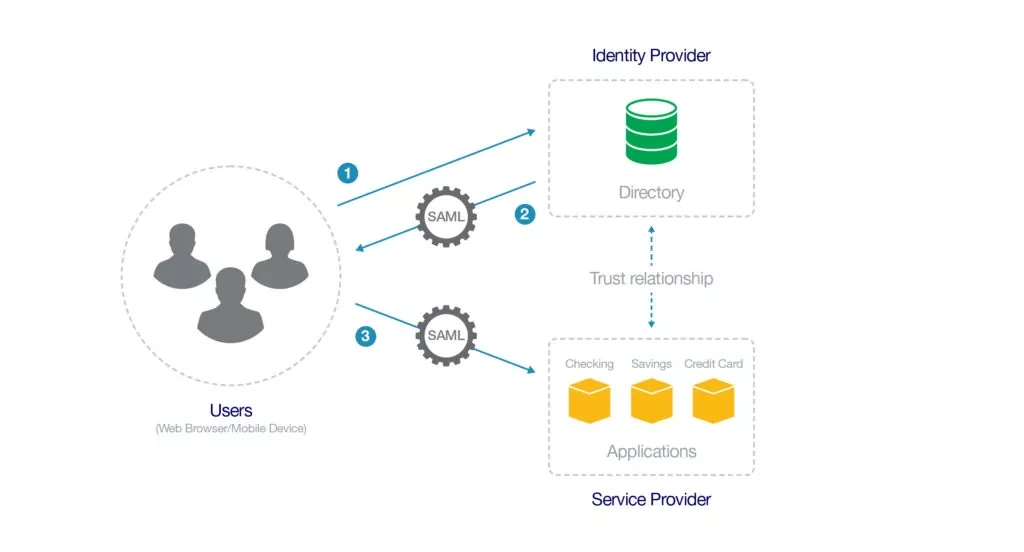
Put simply, SSO works through an established trust between the identity provider (IdP) and the service provider (SP). This means that when the IdP says the person using the application is 'Jan Jansen', the SP accepts this and signs the user in under the 'Jan Jansen' account.
The systems administrator establishes this trust. Information from the IdP is passed to the SP along with a certificate, and vice versa. When a user opens an application, the IdP uses the certificate to sign and encrypt an assertion. This assertion is then sent to the SP instead of the user's credentials. The SP ensures that this is decrypted and verified.
By establishing this trust relationship, SPs do not need to store credentials locally.
How Does Single Sign-On Work in Practice?
The above explains how SSO generally works. But how does this work in practice: how does a user open an application, and how does an SP know it must check with the IdP?
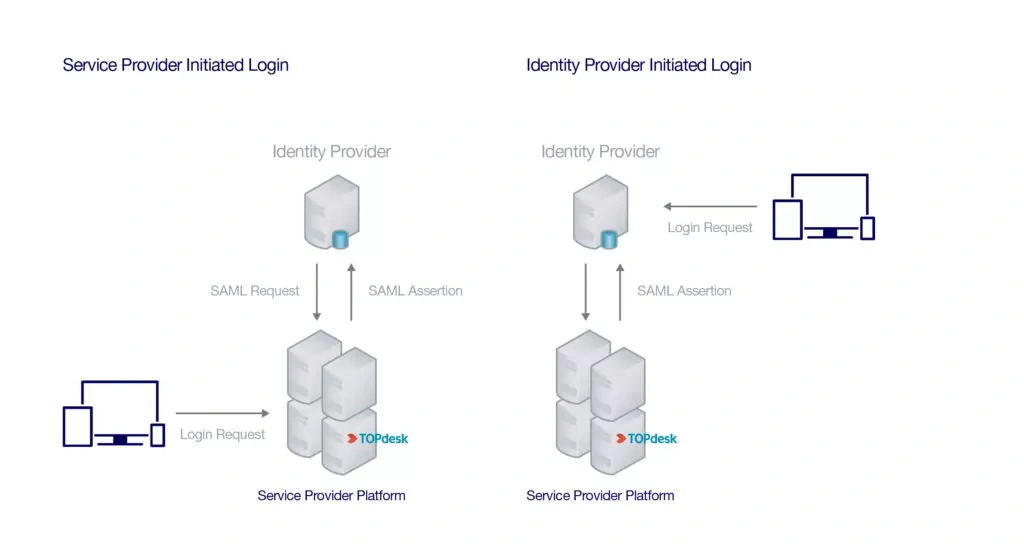
Most Single Sign-On IdPs come with application portals. These are often web-based applications that users can access from anywhere in the world. Once a user signs in to the portal with their credentials, they receive access to all applications and resources needed to perform their work. After the user selects an application, an SSO assertion is sent to the SP with the user's information. If the assertion is accepted, the user is taken to the application and can get to work immediately. This type of SSO activity is 'IdP-initiated' because it originates from the Identity Provider (IdP).
But what if the user does not go to the portal first? For example, what happens if they open Gmail directly in the browser? In such cases, the SP knows what to do based on the username or the user's email domain. Instead of storing credentials, the SP stores the IdP information and knows where to route the authentication request. This type of request is "SP Initiated" because the SSO request originated from the service provider (SP).
Learn More About Cloud Single Sign-On
Not a Tools4ever customer yet, but interested in the capabilities?
Schedule a MeetingRelated Articles
- From Startup to Scale-Up. Who Still Has Access to What?
- Tips for Your Reorganization with IAM
- Organizing RBAC with Role Mining
- SAML vs OAuth vs OpenID Connect
- More secure login with FIDO2?
- How do you prevent credential phishing?
- 9 best practices for identity and access management (IAM)
- Onboarding checklist
- Access Management: Troubleshooting and Best Practices
- RBAC best practices for effective access management