







Access Management - Connect One or More Identity Providers
Many applications can connect to only one identity provider (IdP). That is inconvenient, because many organizations use multiple IdPs. HelloID provides a solution that enables connecting multiple IdPs. This ensures that all users in your organization have access to the right applications.
HelloID Access Management is a cloud-based module within Tools4ever’s HelloID IAM solution. The module provides employees with simple, fast, and user-friendly access to the applications they rely on. HelloID Access Management supports Single Sign-On (SSO), so users log in only once to access all their applications.

Do you work with multiple IdPs, such as a combination of Google Workspace and Microsoft Entra ID? This can create challenges when providing application access for employees. Many applications support only one IdP. As a result, only users with a Google Workspace account can access a specific application, while users with a Microsoft Entra ID cannot. HelloID Access Management provides a solution that, despite application limitations, enables connecting multiple IdPs. In this setup, HelloID acts as the IdP. The IAM solution connects to your different IdPs and ensures that the right information ends up in the right place.
What are the Possible Use Cases?
The use of multiple IdPs occurs across many organizations and scenarios. Consider schools that store student data in Google Workspace while employee information resides in Microsoft Entra ID. Or healthcare organizations that often collaborate in target applications. If the involved healthcare organizations use different IdPs, this creates challenges.
Mergers or reorganizations can also result in multiple IdPs being used within an organization. This can occur when organizations are not fully integrated, or the transition to a new source system has not yet been completed.
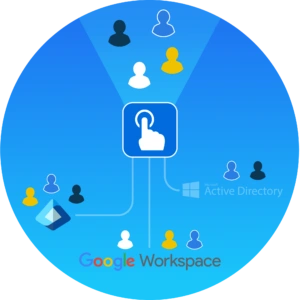
Do employees use only a few applications and not need a full account for them? Then you can use local HelloID accounts. With HelloID Access Management, you can combine these local accounts with, for example, accounts from Google Workspace or Microsoft Entra ID.
In some situations, a user exists in multiple IdPs. For example, a student who works for the school for a few hours per week. In this case, HelloID Access Management can link multiple IdPs to one user object within HelloID. The user then gets access to all the applications they need with a single account, both as a student and an employee. Note: linking multiple IdPs to one user object requires additional configuration.
What Should You Consider?
Using multiple IdPs includes several considerations. In most cases, users see a selection menu at sign-in that lets them choose among different authentication methods. You can set a specific authentication method as the default, so users only need to confirm the selection. HelloID can also present a specific method based on, for example, the user’s IP address or the web browser in use.
Switching to HelloID Access Management? Users will see a different sign-in screen than before. In many cases, they will need to choose between different authentication methods. This can be confusing for users. It is important to communicate this change clearly and promptly.

It is always possible to sign in with a local user login. This option is available as a backup authentication method. The method can be hidden, but it can never be disabled. The local user login allows sign-in only with a local HelloID user ID, and never with an account from a source system connected to HelloID.
Another consideration is the potential additional support load. Using multiple IdPs can create extra work for the support team. If a user experiences sign-in issues, the support team must first determine which authentication method the user attempted to use before the root cause can be identified.
Get Started
Want to get started with HelloID Access Management? Read here to learn more about the capabilities. Want to consult with our experts or have questions? Contact us.