








Notifications and Thresholds
As an Identity and Access Management (IAM) solution, HelloID performs a critical function in your IT environment. The solution can automate many actions for you, but you also want to maintain control and visibility. For this reason, we use thresholds that prevent a problem in your source system or its connection from causing HelloID to block or delete all accounts. If HelloID performs certain actions in your target systems, you want the relevant stakeholders to be informed in a timely manner as well. HelloID’s notification feature enables this. This blog covers thresholds, sending notifications, and configuring these messages.
What Are Thresholds?
Thresholds play a critical role within HelloID. The automated actions that HelloID performs save you a lot of time and streamline processes. At the same time, you want to eliminate risks; you do not want HelloID to make unintended or incorrect changes to accounts or permissions. If, for example, HelloID accidentally removed all accounts from a target system, employees would no longer be able to work in that system, which could significantly impact operations.

Thresholds help minimize these risks. You can view thresholds as a safety net that catches unintended actions. They ensure that the impact of an unforeseen error in an integration or connected application remains manageable and limited.
Configuring thresholds is straightforward. Go to either ‘Source’ or ‘Target Systems’ in the HelloID Provisioning dashboard and open the ‘Thresholds’ tab. Then specify the limits, which can be absolute values or percentages.
Thresholds for Source Systems
For source systems, you can, for example, set thresholds to prevent incorrect HR data imports. If your HR system is temporarily unavailable due to an outage, HelloID may be able to retrieve only part of your HR data. When comparing this snapshot with the existing snapshot, a large amount of data would then be missing. HelloID could therefore assume that many people have left the organization. Without thresholds, HelloID would process this new snapshot, potentially causing the IAM solution to block or delete a large number of accounts in error. Another example is a poor or unannounced organizational change that suddenly surfaces different departments or job titles from the HR system. In theory, this could result in many roles being revoked.
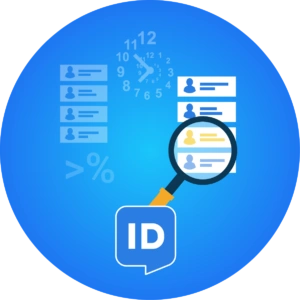
Thresholds prevent this and mitigate the risk. For example, you can require that a snapshot not deviate by more than 5% from the previous snapshot. If the import exceeds this limit, HelloID will not perform its scheduled automated actions.

Thresholds for Target Systems
You can also set thresholds for target systems. This is important because when you adjust a business rule, you want to ensure the change produces the intended outcome. For example, you want to prevent HelloID from unexpectedly revoking user entitlements due to an incorrect change in a business rule.
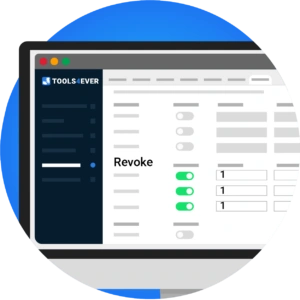
You can ensure this with thresholds as well. If you set all thresholds at ‘Count’ to 1 for ‘Revoke’ and ‘Update’, you ensure that HelloID may only create new accounts and may not modify or delete existing accounts. This is also useful when you want to test a business rule on a single person without affecting other users.

If an action exceeds a configured source or target threshold, HelloID blocks the execution and submits it to an administrator. The administrator can analyze the blocked action or actions and, if desired, execute them with a single click.
What Can You Send a Notification For?
If HelloID blocks an action due to a threshold, informing the right stakeholders in time is critical; you do not want blocked actions to go unnoticed and unaddressed. Notifications prevent this.

HelloID can also send notifications for many other actions performed by the IAM solution. Examples include creating, activating, or updating an account, as well as deactivating or deleting an account. HelloID can also send notifications several days before an employee’s onboarding or offboarding. This ensures that the right people are informed in time about staff joining or leaving. In addition, HelloID can send a summary of completed evaluations in an email notification.
Configuring Notifications
You can create and configure notifications in the HelloID Provisioning dashboard. Go to the Notifications tab to view all configured notifications. You can add a new notification using the plus button or modify an existing notification via the gear icon.

There are two options for composing notifications: a WYSIWYG editor or raw HTML. If you want to use the latter, you can specify this on the Settings tab. You can also name the notification here and select which event in the target system should trigger it, such as account creation. In addition, you specify which target system the notification is linked to.
You can then configure email settings, such as the from address used for notifications. Also specify the email address to which the notification should be sent, and use variables to insert the correct address. The same applies to the subject line and account data from other systems.
Working with Variables
You can include various variables in notifications. Examples include a username, gender, date of birth, preferred name, first and last name, address details, email address, start and end dates of a contract, and the department a user works for. These can be person variables or account variables.

Use syntax to reference and insert these variables into notifications. For example, you can insert a username with , while inserts the contract start date.

The variables you can include in notifications depend on your target system and mapping configuration. In our documentation, you will find an overview with examples of variables that you can include in your notifications when using AD.
Designing Notifications
Once you have configured the notifications, you can design them. In this blog, we assume the use of the WYSIWYG editor to compose the notification. As noted, you can also use raw HTML.

You design a notification on the ‘Message’ tab. In the editor, you write the text to include in the notification, where you can reference variables using syntax. You also control the formatting of the notification through the editor. For example, you can apply your brand style and colors in the notification, as well as a logo.

The editor offers broad capabilities. You can add columns, images, and text fields, and you can create links to social media or embed elements from social media. The editor lets you quickly and easily create a notification according to your preferences.
Get Started
Ready to work with thresholds and notifications in HelloID? In a short video, we help you get started and outline the key considerations. Also, review our documentation, where we provide additional information and guidance. Do you have questions? Contact us!