







Correlation of existing accounts
With correlations, HelloID knows exactly which accounts in target systems belong to which person records in the Identity & Access Management (IAM) solution. This prevents HelloID from creating unnecessary and duplicate accounts in the target system, and ensures that employee offboarding is processed correctly. You also ensure that all relevant information is linked to the correct account and remains linked. This blog explains how to correlate accounts in HelloID, the capabilities of the correlation function, and correlation reports.
What is correlation?
The HelloID Provisioning module can push data to external target systems such as Microsoft Active Directory (AD), Microsoft Azure AD, and many other applications. Person records in HelloID may already be present in a target system to which you want to push them.

By correlating accounts, you ensure that HelloID understands which people in HelloID and which accounts in a target system are connected. During provisioning, the IAM solution searches the target system for matching accounts based on values you define. You are in control.
It is important to note that correlation usually takes place in production, not in a greenfield environment. Operations must continue at all times without business disruption. This makes correlation a critical process that must be executed with great care.
Why is correlation relevant?
If HelloID does not link existing entries in a target system to the correct entries in HelloID, problems can occur. HelloID could inadvertently create duplicate accounts. It could also fail to deactivate an account when an employee leaves.

Duplicate accounts in target systems can lead to confusion, ambiguity, and errors. If you want to modify an account, duplicates can cause you to apply changes to the wrong account. Reporting is also affected, since duplicates create confusion and distorted figures. The correlation function in HelloID prevents these issues. It links accounts in target systems to the person records that HelloID creates based on your source systems. This ensures that accounts are represented in your target systems in a uniform, consistent, and unambiguous way.
Benefits of correlating accounts
Correlating accounts in HelloID provides several benefits, including:
Preventing duplicate or unnecessary accounts in the target system
Correct processing of employee offboarding
Accurate linking of all relevant information to the correct account
Correlation in practice
HelloID correlates data based on matching values. The preferred method uses the employee number, although other options are available. If employee numbers are unsuitable, correlation can be based on email address. You select the values HelloID uses through configuration. There you specify which data HelloID should compare to establish correlations between people in HelloID and user accounts in target systems.
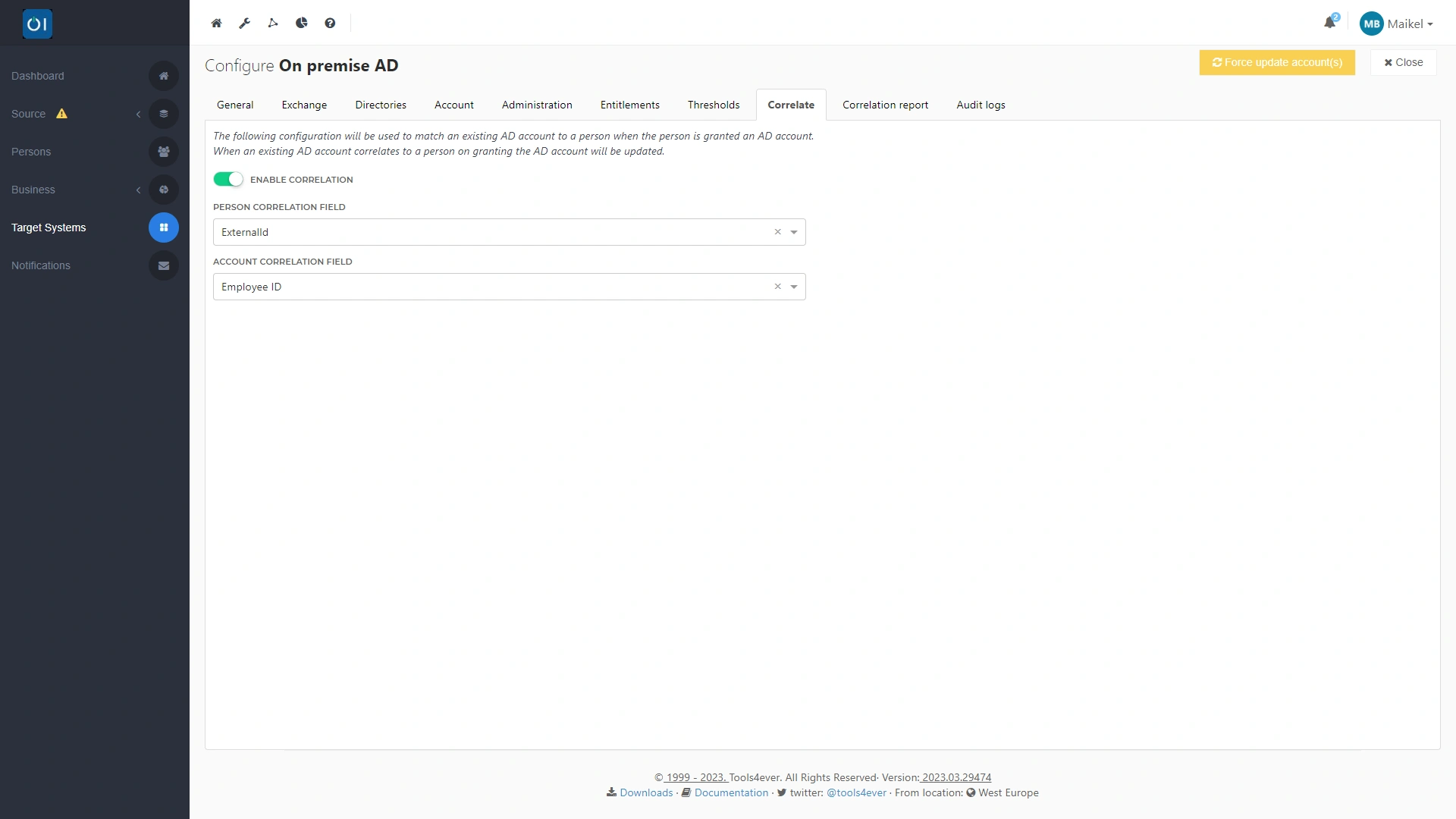
If the snapshot HelloID takes of your HR system indicates that data must be updated, the correlation function ensures the change is applied automatically, correctly, and to the right accounts in your target systems.
Create correlation reports
After you configure correlations in HelloID, you can generate a correlation report. This report provides insight into all correlations applied by HelloID and shows which accounts are not yet correlated. You can then easily identify accounts in the target system that still need to be correlated with a record in HelloID.
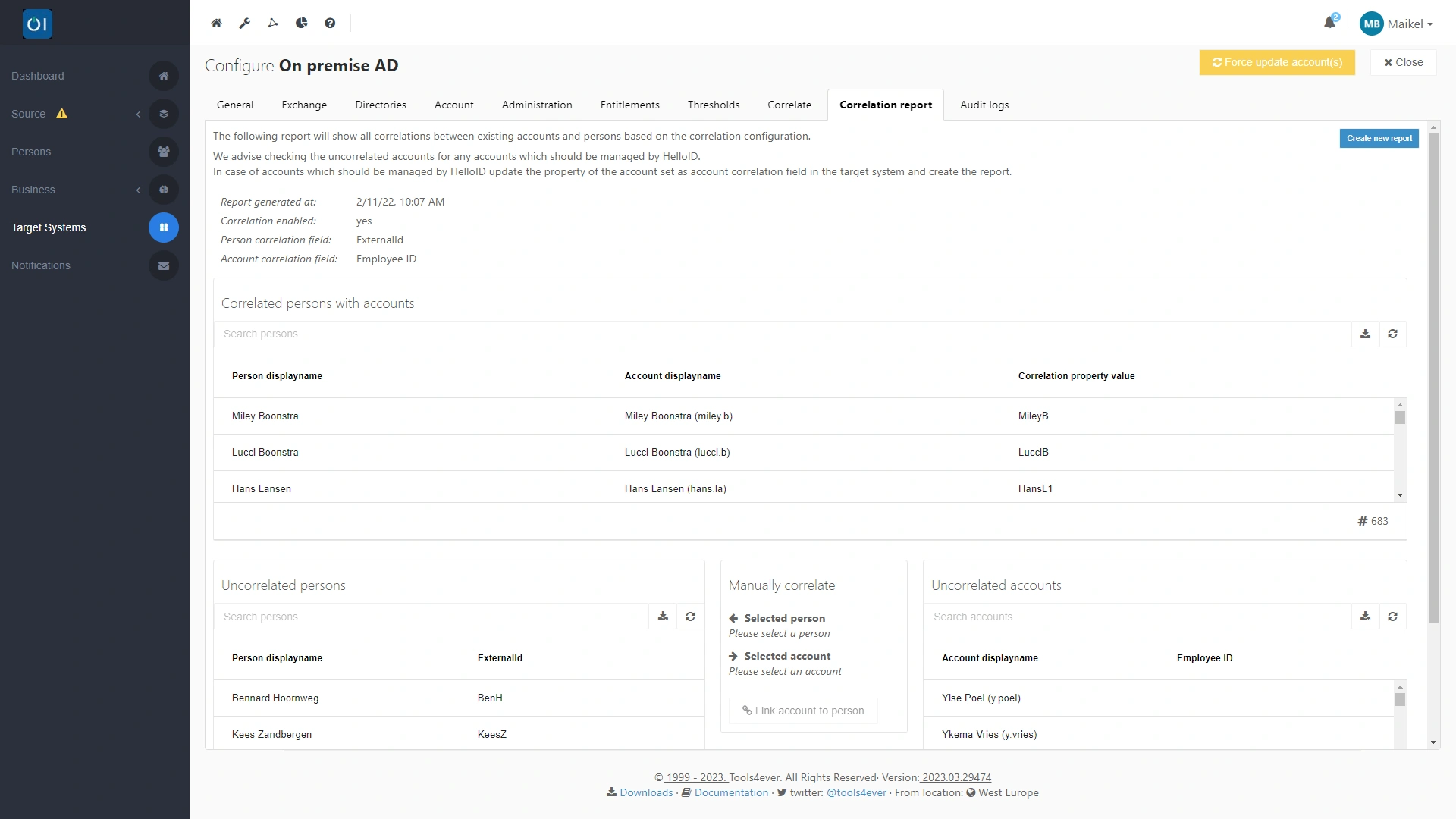
The correlation report also supports creating missing correlations. At the bottom of the report you will find the 'Manually correlate' section. This provides an overview of uncorrelated people and uncorrelated accounts in the target system. By selecting an entry in both lists, you can easily create a manual correlation.
Get started
Correlation reports are available only for Active Directory (AD) and Azure AD. If you use a connector for another system or application, the correlation function is built into the connector and correlation typically takes place based on email address.
Want to get started correlating accounts in (Azure) AD? In the HelloID documentation you will find all the information you need. Does your organization not yet use HelloID? Then schedule a live demonstration.