Password Complexity Manager (PCM)
Since the standard password complexity rules in the Windows domain are limited, Password Complexity Manager (PCM) offers extra abilities to regulate the complexity of passwords.
In comparison to the standard complexity rules within the Windows domain, PCM offers the following extra features:
- The option to set the password complexity at the OU level in the AD domain: here you can make a distinction between various end-users and the degree of password complexity they must utilize;
- Offers all conceivable combinations to establish the Password Policy: It is possible, for example, to provide a list of words which may not be used, or to require that the password complies with a regular expression;
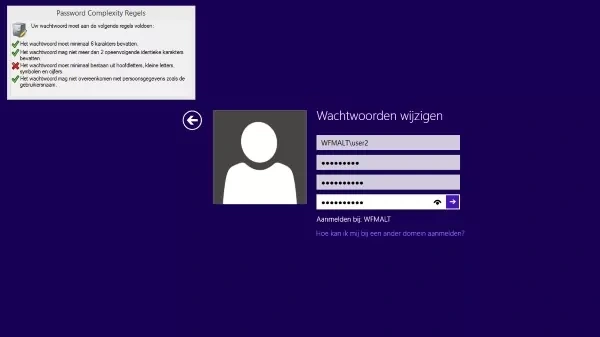
- Provides end-users with information about what rules have been complied with during password resetting: This prevents the end-user receiving a long and unclear error message. Users are immediately assured that the new password complies with all the rules.
Need more password policies for domain user accounts?
Most organizations want to be able to set multiple security levels for different users. However, the standard Password Policies for Domain User Accounts are extremely limited. Thus, the possibilities of Active Directory password complexity rules are restricted - the complexity of passwords cannot be set per section of Active Directory, for example at the Organizational Unit level. Further, upon entering the password, the end-user is not notified which of the various complexity levels the new password fails to meet.
Password Complexity Manager offers system administrators the ability to expand the standard Windows Active Directory password complexity rules. This guarantees an overall increase in security for your network.
Password Synchronization
If an organization has decided to offer the end-user one password for all systems and applications, it is vital that the password policy of Windows is in line with the other systems and applications. A new password in Windows must meet the requirements for all other systems and applications.
Native Integration with Windows
PCM has seamless integration with the domain controllers in the network and meets the standards Microsoft sets for integration with a domain controller. The basic operation of MS password management remains unchanged and does not detract in any way from the security levels of Microsoft password management.
Granular Control of Policies
With PCM you can implement multiple Password Policies at various levels, namely each domain and Organizational Unit (OU).
Interface for Setting Complexity Rules
PCM offers a number of defined rules and allows system administrators to determine which rules will be applied and when. Possible rules are:
- Minimum password length (shorter than 8 characters is allowed);
- Maximum password length;
- Maximum number of repeated characters. This prevents passwords with the same characters;
- Password must contain upper case letter(s);
- Password must contain lower case letter(s);
- Password must contain punctuation mark(s);
- Password must contain numeral(s);
- Password must contain character(s) from a specific series;
- Password must be x percentage different from old passwords. This avoids, for example, the addition of a number to the end of a new password;
- Password must conform to a normal expression;
- Password may not conform to a normal expression.
The existing Active Directory password complexity rules continue to be applicable. If PCM contains a stronger rule than AD, this will apply. With a weaker rule in PCM, the AD rule applies.
Immediate Feedback
A modified GINA client is supplied within PCM that checks when a password is changed whether the new password complies with the PCM or the configured AD rules. On entry of the password, the PCM-GINA indicates with a check mark whether each rule has been met. This gives the end-user immediate feedback about whether or not the new password complies with complexity rules and allows them to modify the password in real time.
Integration of Password Management Solutions
Password Complexity Manager can be integrated seamlessly with other Password Management solutions from Tools4ever, such as
Self Service Reset Password Management (SSRPM).
With Tools4ever's SSRPM, end-users themselves can reset their passwords based on a number of simple, predefined questions. When organizations deploy SSRPM in combination with PCM, end-users setting a new password are notified of the configured complexity rules in the same screen and the check marks are also visible.
Maximum Security
By expanding the standard Windows Active Directory password complexity rules, system administrators have access to a more complete password policy. It is possible to use multiple security levels for various types of end-users, based on their functions and roles within the organization. The degree of password complexity can also be configured flexibly. This greatly enhances the security of the network.
User Friendly
End-users are notified in a graphical, user-friendly way whether the newly chosen password complies with the complexity rules. While entering a new password, checkmarks indicate which rules have been met. Conversely, it is immediately apparent to the users which rules have not yet been met. This user-friendly experience replaces the long, confusing error message which Windows gives by default.
Compliancy
The standard complexity rules within the Windows domain are often too restrictive to meet the demands imposed by HIPAA, SOX, etc. With Tools4ever’s PCM, this is no longer a problem. Our solution supports every conceivable requirement and Tools4ever has policies available per compliancy type.
Simple Installation
Password Complexity Manager is a standard product and can easily be installed and configured by a system administrator within an hour. PCM is managed via a system administration management console, where the PCM policies can be set for all domain controllers in one central place.
Software Requirements
| Operating System | ||
|---|---|---|
| Operating System | Type | Version |
| Windows 2003 | 32 & 64 bits | all versions |
| Windows XP | 32 & 64 bits | all versions |
| Windows 2008 | 32 & 64 bits | all versions |
| Windows Vista | 32 & 64 bits | all versions |
| Windows 7 | 32 & 64 bits | all versions |
Minimal Hardware Requirements
Processor: Pentium III (Pentium 4 or higher recommended)
Memory: 512 MB RAM (1 GB or more recommended)
Hard disk space: 256 MB (1 GB or more recommended)
Depending on the exact configuration and used components the system requirements may vary.